
The Vocabulary Trainer for Your Classroom
Learning vocabulary has never been this effective: ClassCards combines proven learning science with an intuitive platform built specifically for schools. Teachers stay in control, students learn sustainably — free and GDPR-compliant.
Why a Digital Vocabulary Trainer?
Traditional flashcard boxes have had their day. A digital vocabulary trainer schedules reviews automatically, adapts to each student's individual learning progress, and gives teachers valuable insight into the progress of every single student.
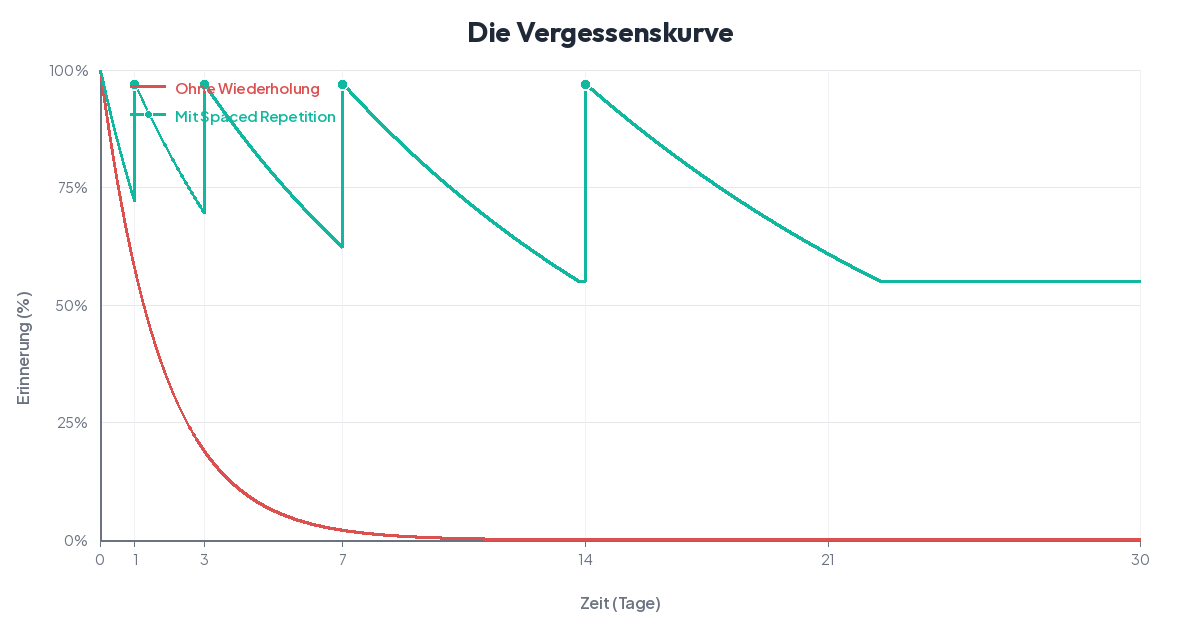
Sustainable Learning
The FSRS algorithm (Free Spaced Repetition Scheduler) calculates the optimal review time for each flashcard. This moves vocabulary into long-term memory — not just short-term memory for the next test.
Save Time
No more sorting physical flashcard boxes or creating review schedules manually. ClassCards handles all planning automatically. Teachers can enter cards manually, import a list, or generate cards with the built-in AI in seconds.
Make Progress Visible
Teachers see in real time which students are practicing regularly, which flashcards are causing difficulties, and where targeted support is needed. No more surprises at the next vocabulary test.
How ClassCards Works
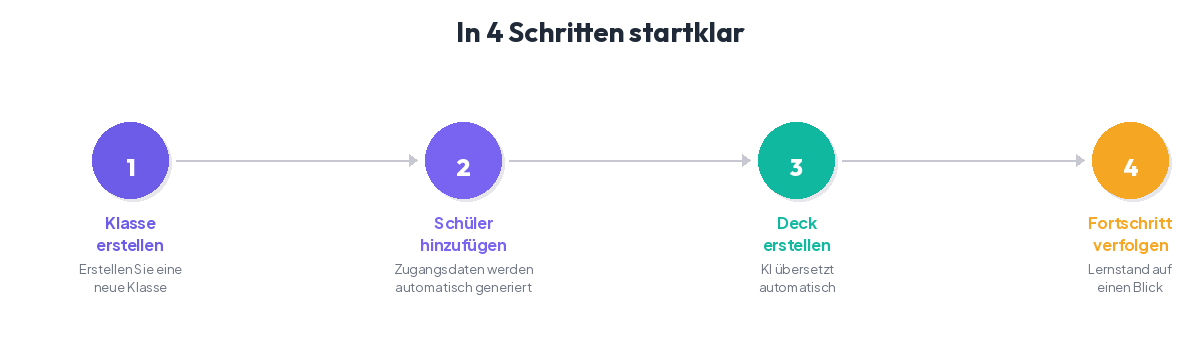
Teacher Creates Flashcards
Enter cards manually, import them as a list, or have them generated automatically with the built-in AI. Example sentences and tags help with organization.
Students Practice Flexibly
Three practice modes are available: classic flashcard flip, typing mode with direct input, and multiple-choice quiz. On any device, at any time.
FSRS Plans Optimal Reviews
The FSRS algorithm analyzes how well each flashcard is known and schedules the next review automatically. Difficult words appear more often, known words less often.
Comparison: ClassCards vs. Alternatives
How does ClassCards stack up against other vocabulary trainers? Here is an honest overview:
| Feature | ClassCards | Quizlet | Phase6 | Anki | Cabuu | PONS |
|---|---|---|---|---|---|---|
| Free | ✓ | Limited | ✗ from €36/yr | ✓ | Limited | ✗ from €5/mo |
| GDPR-Compliant | ✓ EU servers | ✗ US provider | ✓ | Self-Hosting | ✓ | ✓ |
| Spaced Repetition | ✓ FSRS | ✗ | ✓ | ✓ FSRS/SM-2 | Partial | Partial |
| Class Management | ✓ | ✓ | ✗ | ✗ | Partial | On Request |
| Progress Dashboard | ✓ | Limited | ✗ | ✗ | ✗ | ✗ |
| Individualized Tests | ✓ | Adaptive | Adaptive | ✓ | ✗ | ✗ |
| Card Generation (AI) | ✓ EU AI | ✓ | ✗ | Add-ons | ✗ | Pro version |
| Ad-Free | ✓ | ✗ Freemium | ✓ | ✓ | ✓ | ✓ |
Study vocabulary systematically — try it free
Get Started FreeFrequently Asked Questions about ClassCards
How much does ClassCards cost?
ClassCards offers 6 months of full free access for teachers — all features, no restrictions. After that, Premium costs €15/year. Students always have full free access.
Is ClassCards GDPR-compliant?
Yes. ClassCards is hosted on servers in the EU, collects only the data necessary for operation, and meets the requirements of the European General Data Protection Regulation (GDPR). No data is shared with third parties.
What is spaced repetition and why does it work?
Spaced repetition is a scientifically proven learning method. Instead of reviewing all flashcards at once, the intervals between reviews are gradually increased. This actively combats forgetting and anchors knowledge in long-term memory. ClassCards uses the modern FSRS algorithm for this.
Can I import existing vocabulary lists?
Yes. You can import vocabulary lists directly into ClassCards. Alternatively, you can enter cards manually or have them generated by the built-in AI.
Get Started Free Today
Create your first flashcards in minutes and experience how effective spaced repetition is in the classroom.
Get Started Free