
Digital Flashcards for Classrooms
Digital flashcards are at the heart of every effective spaced repetition system. With ClassCards, you create high-quality flashcards in seconds — and your students benefit from scientifically proven learning methods.
3 Ways to Create a Flashcard
Whether you want to add a single card or prepare a complete lesson — ClassCards offers the right approach for every workflow:
Create Manually
Enter the front side (e.g. an English word) and the back side (e.g. the translation or definition). Add hints and tags. Ideal for targeted additions and individual customizations.
List Import
Already have vocabulary lists in Excel, Google Sheets, or another application? Import them directly into ClassCards. Columns are mapped automatically — with a preview before confirming the import.
What Makes a Good Flashcard?
Not every flashcard is equally effective. Research shows that the design of a card has a significant impact on learning outcomes. Keep these proven principles in mind:
- One piece of information per card: Each flashcard should test exactly one term or concept. Multiple pieces of information on a single card overload working memory and make spaced repetition less effective.
- Use example sentences: Seeing a vocabulary card in context helps enormously with retention. The sentence "The cat sat on the mat" anchors the word "mat" far better than an isolated translation.
- Add images and context: Visual associations strengthen memory. Where possible, enrich your cards with images, mnemonics, or cultural notes.
- Review regularly: Flashcards are not static material. Adjust phrasing, remove cards that are too easy, and add new ones when students show difficulties.
Learning Flashcards in Context — with Gap Fill
Drilling isolated flashcards is not very effective. Research shows: words learned in the context of a sentence are retained significantly better. ClassCards supports exactly this — with an integrated gap fill mode.
How It Works
When creating a flashcard, you can enter a context sentence on the front or back side. The target word is simply bolded (select text → B button or Ctrl+B) — ClassCards then automatically recognizes it as the gap word.
Example:
In gap fill mode, students then see: "The cat sat on the _____." — and must type the bolded word mat. The input is checked automatically (including tolerance for typos).
Why Context Matters
If students only learn the word "mat" as an isolated flashcard, it stays an abstract association. In the context sentence "The cat sat on the mat," the word is embedded in a real situation — the brain links meaning, grammar, and usage simultaneously. The result: faster learning and more durable retention.
Study flashcards systematically — try it free
Get Started FreeFrom Flashcard to Long-Term Memory
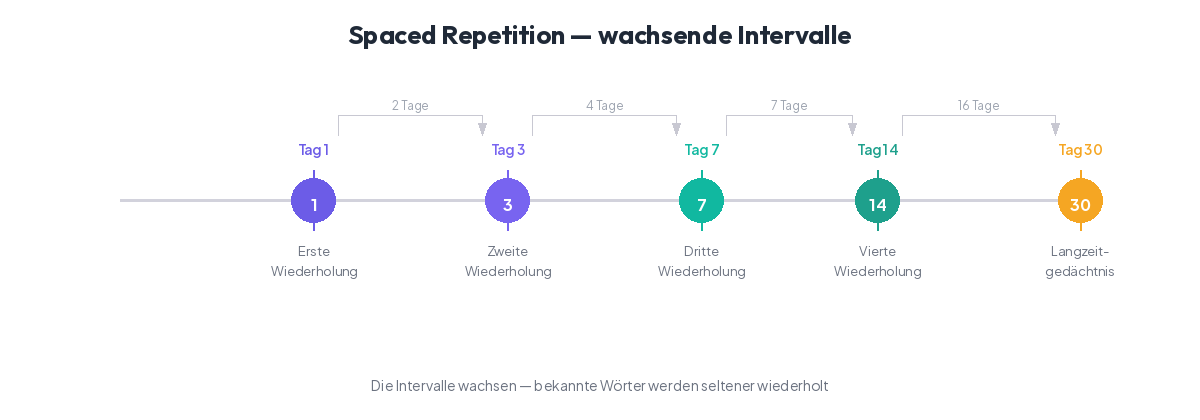
In 1885, German psychologist Hermann Ebbinghaus discovered a phenomenon that still underpins modern learning science: the forgetting curve. His research showed that without review, we forget up to 80% of what we learned within just a few days. The decay begins immediately after learning and accelerates the longer no review takes place.
The good news: targeted reviews at the right moment can dramatically flatten the forgetting curve. Each review strengthens the neural connection, and the interval until the next necessary review grows longer. This principle is called Spaced Repetition.
ClassCards uses the FSRS algorithm (Free Spaced Repetition Scheduler), a modern successor to the classic SM-2 algorithm. FSRS analyzes how well each individual flashcard is known and calculates the optimal timing for the next review. Cards you know well reappear after weeks or months. Difficult cards are reviewed more frequently — until they too are securely anchored in long-term memory.
The result: less time spent studying with better outcomes. Instead of cramming all flashcards before an exam, students using ClassCards learn continuously and efficiently — retaining knowledge long-term.
Get Started Free Today
Create your first flashcards in minutes — manually or via list import. Free, no credit card required.
Get Started Free